
Team Leader Permissions
In this article
In bilabl, a team is a group of users who work together, such as a practice group or a department. A team leader is a member of a team who gets the entity permissions of the other members. The team leader can then work on the same clients and matters as the team, without being assigned to each one.
An entity is a client or a matter. Your entity's permission applies to one specific client or matter and decides what you can see and do there. There are two entity permissions: Owner and Assistant (see Permission Overview). A team leader is not a user role. A team leader keeps their own user role and entity permissions, and bilabl shows Team Leader next to their name.
Users whose role is Administrator, Manager, or HR set up team leaders in the Team leader column of the Team tab in People. A team leader must be a member of the team they lead. Each user can belong to only one team, and a team can have more than one team leader. To create a team and add members, see Teams.
Permissions from team members
For each client and matter that a team member is assigned to, the team leader gets the same entity permission as that team member. If team members have different permissions on the same client or matter, the team leader gets the higher one. You do not need to assign the team leader. Team members do not get the team leader's permission.
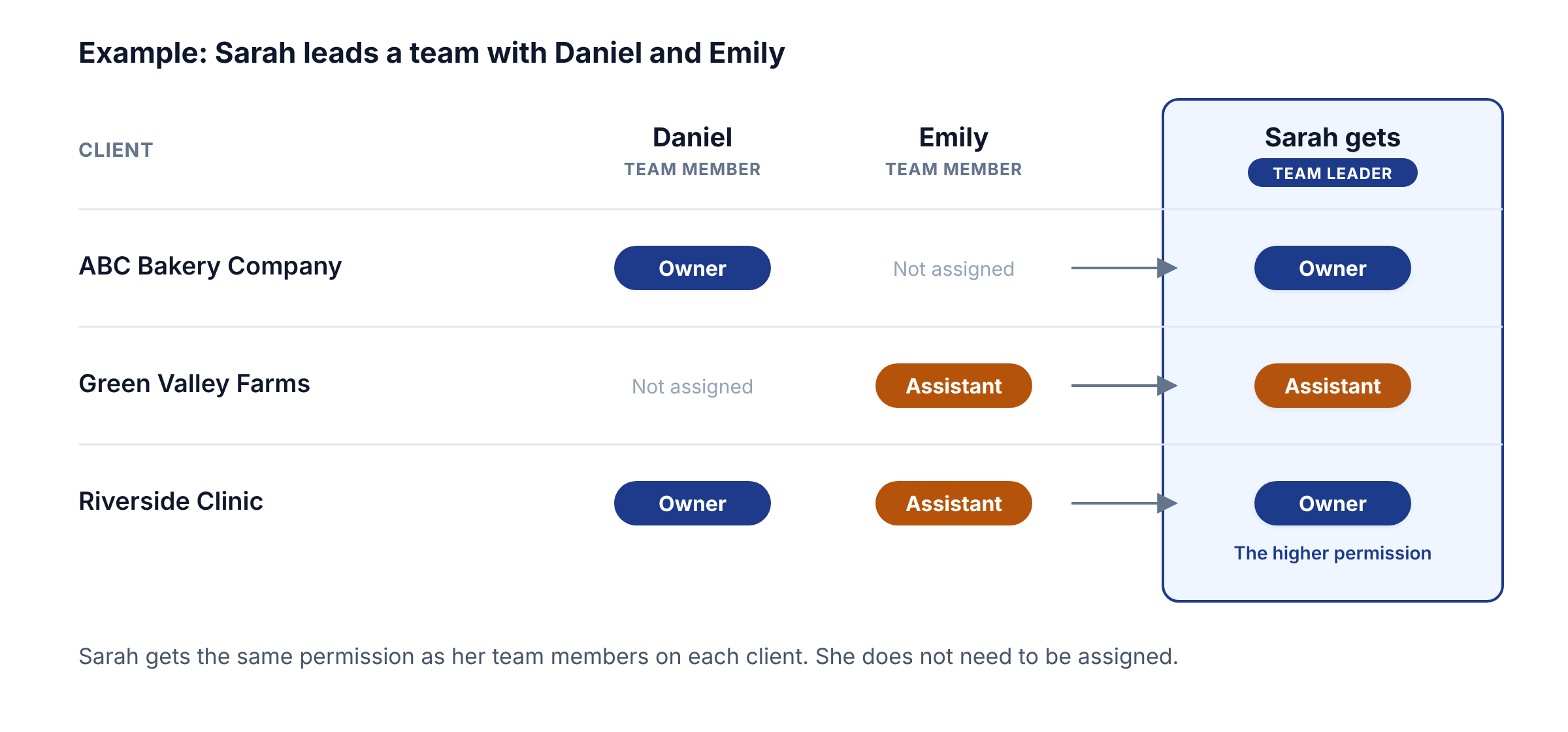
For example, Sarah leads a team with Daniel and Emily:
- Daniel is an Owner of ABC Bakery Company, so Sarah is also an Owner of ABC Bakery Company.
- Emily is an Assistant on Green Valley Farms, so Sarah is also an Assistant on Green Valley Farms.
- Daniel is an Owner of Riverside Clinic, and Emily is an Assistant on it, so Sarah is an Owner of Riverside Clinic (Owner is higher than Assistant).
Team leader access
The table shows the extra access a team leader gets from their team. The team leader also keeps all the access from their own user role and entity permissions.
To check which team leaders can access a client or matter, open the Manage Visibility window and look at the Other People Who Can Access This Client/Matter section, see Entity Permission.
Team leader access after team changes
bilabl updates a team leader's access immediately:
- A team member is assigned to a new client or matter: The team leader gets that team member's entity permission on that client or matter, unless the team leader already has a higher one.
- A user joins the team: The team leader gets that team member's entity permissions.
- A team member leaves the team: The team leader loses the entity permissions they got from that team member. If another team member is still assigned to the same client or matter, the team leader keeps the permission they get from that other team member.
- A team member's user account is closed: The team leader keeps the entity permissions they got from that team member. To remove these permissions, remove that user from the team.
- A user is no longer a team leader: The user loses all the access they got as a team leader.
Troubleshooting
To change who is assigned to a client or matter, ask an Owner of that client or matter, a Manager, or an Administrator. To change who leads a team or who is in it, ask HR, a Manager, or an Administrator.


