
Send a billing statement by email
In this article
TOC heading H2 here
Header H2
TOC heading H3
TOC heading H4
TOC heading
TOC heading
bilabl lets you email a billing statement to your client directly, without downloading it or switching to a separate email application. It attaches the billing statement as a PDF and fills in the email from a template, so sending one takes only a few steps.
Before you start
- Billing Email Delivery is an add-on available on the Pro plan or higher, so if you do not see the Email button, contact bilabl support at support@bilabl.io to have it enabled for your firm.
- By default, bilabl sends from billing@bilabl.io using your firm's default template, so you can send straight away. To send from your own address instead, see Connect your email account. To change the email content, see Set up billing email templates.
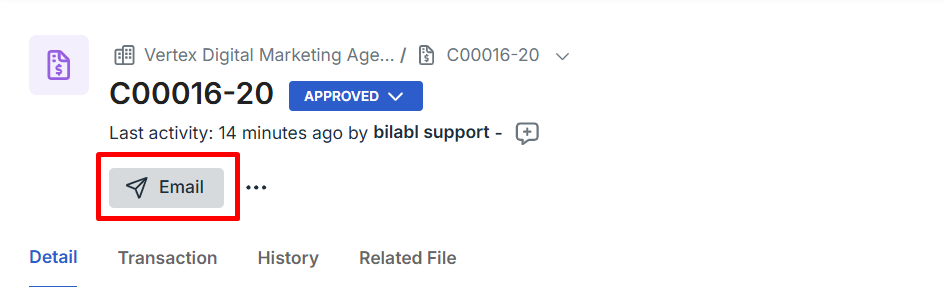
To send a billing statement by email, go to Billing and open the billing statement you want to send. On the billing statement, select Email to open the send form.
The Email Billing Statement form opens with the billing statement already attached as a PDF. Work through the form, then send.
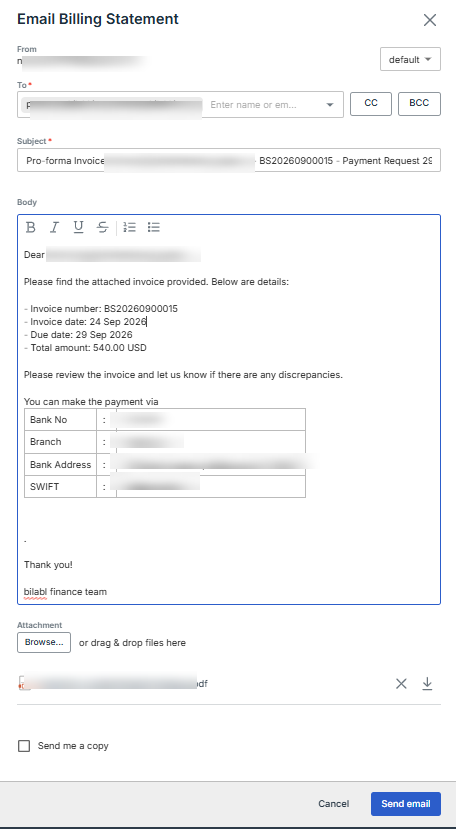
- Check the From address, which shows where the email will be sent from. By default, bilabl sends from billing@bilabl.io. To send from your own email address instead, connect your account first (see Connect your email account); it will then appear here.
- The template is shown in the dropdown next to From, and bilabl fills the Subject and Body with this billing statement's details. If your firm has more than one template, choose a different one and the content updates. Edit the subject or body before sending if you need to. To create or change templates, see Set up billing email templates.
- In the To field, add the client's email address. Type a name or email and select it from the list, or type a new address and press Enter. Use CC or BCC to copy anyone else who should receive it.
- To send more files with the billing statement, select Browse under Attachment and choose the files, or drag and drop them.
- To keep a copy of your own records, select Send me a copy.
- Review the email, then select Send.
Once you send, bilabl marks the billing statement as Sent and records it in the statement's history, so your team can see it has gone out and who sent it.

Want to learn more?
Book a demo with our experts today. Discover how bilabl can help your team in 40 minutes.

See the product. Ask any question.
Learn how our solution will save you time and money

