
Mail to Matter
In this article
Mail to Matter
The Mail to Matter feature allows you to automatically save emails and their attachments directly to a specific Matter in bilabl. By simply adding the Matter's unique Mail to Matter address as a recipient (To, CC, or BCC), the system captures the email and stores it in the Matter's Correspondence folder - keeping all communications organized and immediately accessible.
Discover the step-by-step guide:
Prerequisites
Before using Mail to Matter, ensure the following requirements are met.
- An Administrator must enable the feature first: Your site Administrator must activate the Mail to Matter feature in the tenant settings before it becomes available. If you do not see the Mail to the Matter email address on a Matter, contact your Administrator to request activation.
- Permission required: Any user who has access to view a Matter can use Mail to Matter for that Matter. This includes the Matter Owner, Matter Assistant, and users whose role grants them access to the Matter.
For more details on roles and permissions in bilabl, see User Role and Entity Permission.
Administrator Setup Guide
If you are a site Administrator, follow these steps to enable the Mail to Matter feature for your organization:
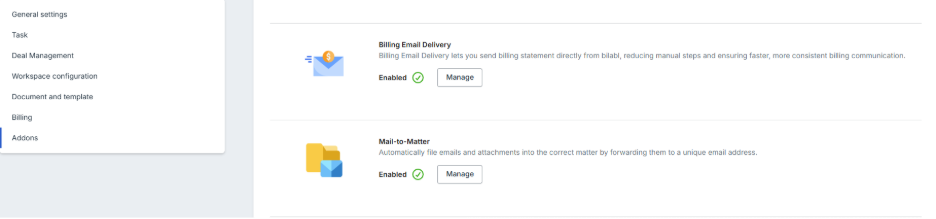
- Navigate to the top right corner, select the Tenant Settings and go to Addons sections.
- Find the Mail to Matter option in the settings list.
- Toggle the Mail to Matter option to ON and save your changes.
Once enabled, the Mail to Matter address will appear in the Correspondence folder of all Matters.
How to Use Mail to Matter
Find the Matter's Mail to Matter Address
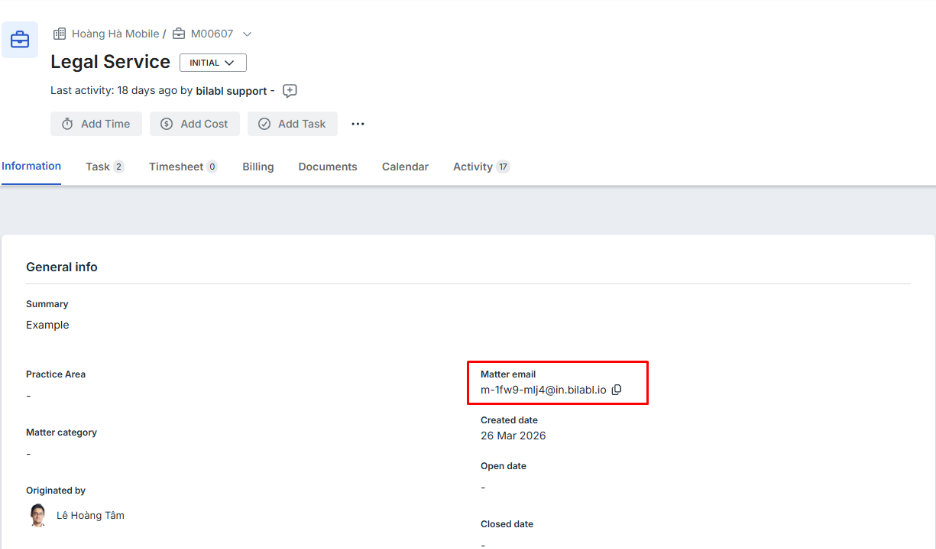
Each Matter has a unique email address generated by bilabl. Follow the steps below to locate it.
- From the top navigation, go to Matters and select the relevant Matter.
- Go to the Information section and locate the Matter email field. Here, you can find the unique Mail to Matter address for the Matter.
Send or forward an email to the Matter
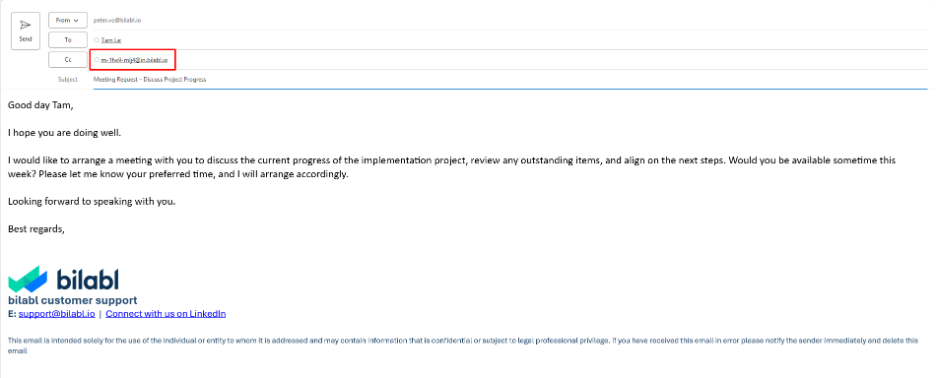
Once you have the Mail to Matter address, simply include it in any email you want to save to the Matter:
1. Open your email client (e.g., Outlook, Gmail) and compose a new email or open an existing thread you want to file.
2. In the To, CC, or BCC field, add the Matter’s Mail to Matter address. You may add it alongside other recipients (using BCC is recommended when you do not want the other recipients to see that the email is being filed to bilabl).
3. Send the email as you normally would. bilabl will automatically detect the Mail to Matter address and process the email.
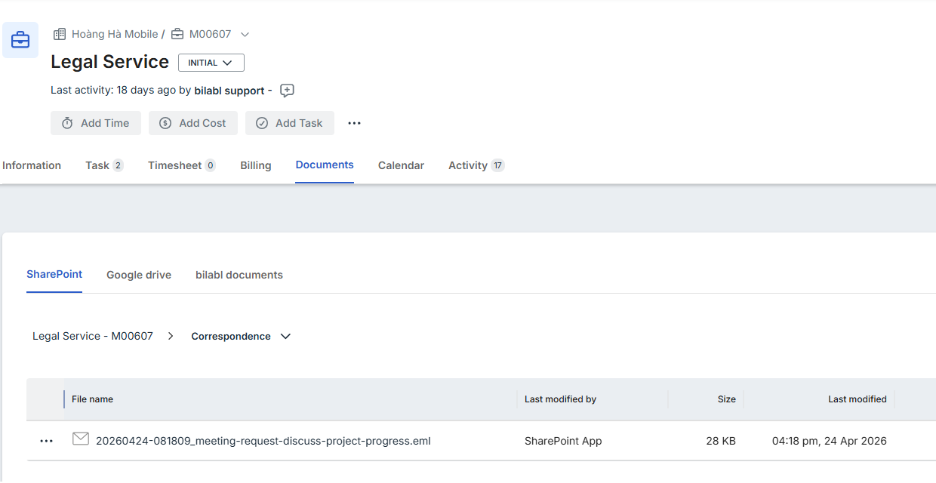
4. Navigate to the Documents tab, then go to the storage location (SharePoint, Google Drive, or bilabl as the default) and open the Correspondence folder to verify the email and its attachments have been saved successfully. It may take a moment for the email to appear. Refresh the page if needed.
Frequently Asked Questions
I cannot see the Mail to Matter address in my Matter. Why?
This is most likely because the feature has not been enabled by your site Administrator. Contact your Administrator and ask them to enable Mail to Matter in the tenant settings.
Does Mail to Matter work with all email clients, such as Outlook or Gmail?
Yes. Mail to Matter works with any email client. If you include the Matter's unique Mail to Matter address in the To, CC, or BCC field, bilabl will automatically identify the Matter and save the email to the correct Correspondence folder — regardless of which email client you use.
What happens to the attachments?
All attachments in the email are automatically saved alongside the email in the Correspondence folder of the Matter.
Can I save an email that I have already sent or received by using Mail to Matter?
Yes. Simply forward the existing email and add the Matter's unique Mail to Matter address in the To, CC, or BCC field before sending. bilabl will detect the address and save the email along with any attachments to the correct Matter's Correspondence folder.
How long does it take for the email to appear in bilabl?
Emails are typically processed within a few seconds to a minute. If the email does not appear immediately, wait a moment and refresh the Correspondence folder page.
Will every email I send to the Mail to Matter address be saved to the right Matter?
Yes. Each Matter has its own unique Mail to Matter address. Whenever you include that address in an email, bilabl automatically recognizes it and saves the email to that specific Matter's Correspondence folder. You can send as many emails as needed, and each will be stored as a separate record in that specific Matter.


